This is the multi-page printable view of this section. Click here to print.
Theory
1 - How SelfPrivacy automates server management
Self-hosted means “independent server hosting” or “hosting yourself”. This is when IT people do not use popular services like Google, they install free (like freedom) alternatives on their own or rented servers (VPS). It turns out that you get the same service, but under your own control. Often, free analogues will be more functional, private and secure than free off-the-shelf options from big companies.
Self-hosting provides complete privacy of data, including meta-information. But it also imposes an obligation to manually operate the system:
- You need to set up a domain for the application and a TLS certificate;
- You need to take care of the server security;
- Do not miss critical security updates;
- Make regular backups;
- Make sure that the disk does not overflow;
- Create and delete service users;
For an IT person, the tasks are manageable, even though they are troublesome. But for the rest of us, they are almost unbearable. The task of SelfPrivacy is to simplify this process as much as possible. You don’t need to use a console or be a skilled technician. The program automates all for you.
Domain Management
Full automation
Once you have configured your domain on CloudFlare and copied the API key into the SelfPrivacy application — your domain is managed completely automatically:
- Records are created for all services;
- Updated if necessary;
All you have to do is pay for the domain once a year at your registrar. Don’t forget to check your email account.
Certificate management
Full automation
Security of communication with your server is ensured by TLS ≥ v.1.2, like in banks. For this purpose SelfPrivacy uses a certificate from Let’s Encrypt, the world’s most popular provider trusted by millions of web portals.
Updating the operating system on your server
Full automation
A once-configured server is not completely secure. Over time, bugs may appear in the services, and the server becomes susceptible to hacking. Unfortunately, this is not such a rare occurrence. That’s why responsible IT professionals regularly update their servers. SelfPrivacy does it for you.
- System updates;
- Major NixOS releases;
Updating the server part of SelfPrivacy
Partial automation
SelfPrivacy consists of two parts - an app on your device, such as your phone or PC, and a server backend called the SelfPrivacy API. SelfPrivacy manages your service providers and your server. To do this, the SelfPrivacy API backend daemon runs on the server side. It also needs to be updated, for example when we add functionality or fix bugs. Updating often happens automatically, but sometimes you have to manually confirm a system configuration update to make the new features of the SelfPrivacy server side work.
Updating SelfPrivacy
Full automation
The SelfPrivacy application, roughly speaking, is a set of instructions that change something in the server. The work of the application after the initial configuration in no way affects the performance of services on your server. Nevertheless, every day we try to automate something, fix something, add new functionality. Application updates are done automatically from the repository, such as F-Droid, in the near future App Store and Google Play.
Server resource management
Partial automation
When there are a lot of users or services, the server can start to slow down. Through the application you can monitor the current resource consumption, and soon it will be possible to order an upgrade of the virtual machine.
Disk management
Partial automation
The application keeps track of the free space on the server disks and allows you to transfer data between them. If the partition is expandable, the app can automatically order more space after user confirmation.
Rescue copies
Full automation
Backups allow you to both repair broken servers and migrate from one server to another. All backups are encrypted, under the hood we use Restic. Each service’s data is backed up individually. Backups can also be done automatically at user-defined intervals.
User Management
Partial automation
Each service has its own administrator interface that allows you to manage users. However, we are working to integrate this functionality into the application and automatically create users from a common list.
Manual management via SSH (expert)
Manual operations
For security reasons, access to SelfPrivacy server administration via SSH is disabled by default. This reduces the attack surface. Console access is needed in exceptional cases:
- Upgrade error, or fixing unexpected situations;
- Server tuning, if you are an experienced NixOS user and want to tweak SelfPrivacy Server for your own needs;
In normal operation, the user does not need to use SSH administration through the console. We are working to ensure that the general configuration of SelfPrivacy can be extended with your own Nix files, which will not interfere with automatic updates.
The system is very complex, why is it private?
All transactions take place between your application, your server, and your service providers without SelfPrivacy being involved. Your copy of SelfPrivacy App is completely autonomous and independent in managing your infrastructure. No information about your interactions with your infrastructure reaches SelfPrivacy. All backups of your services leave your server in a fully encrypted form.
You can read more about this in our privacy policy.
2 - Project architecture
Yes, you could use kubernetes. But why when immutability is ensured by NixOS?
User app: Flutter/Dart was chosen because of the speed and smoothness of the UI and cross-platform.
Server side (backend): NixOS + Python. NixOS was chosen because of its reproducibility, python because of its versatility and popularity.
Service providers
We do not get paid by any service providers! We are not affiliated with them in any way. We chose them purely for professional reasons. But we do not exclude partnership in the future.
Hosting
SelfPrivacy supports two hosting providers: Hetzer and DigitalOcean
Both were chosen because of low price and acceptable level of service, quality REST API.
Candidates:
- Own personal iron server. Our main priority right now;
- A service provider that will provide an API to deploy an iron server. Outside FVEY;
- OVH
- Scaleway
There’s also free Oracle Cloud, but where you don’t pay, you’re usually a commodity.
DNS
There’s a choice between Cloudflare, deSEC, or DigitalOcean DNS.
deSEC is a more private option and is recommended by default.
Cloudflare likely collects data in proxy traffic mode, otherwise it’s hard to explain why they would offer such services for free. In our case, we don’t proxy anything and use it only as a DNS server.
Backup repository
We use Backblaze.
The first 20GB are free and significantly cheaper than AWS. Backblaze publishes its hardware developments in open source. They also shares very useful statistics on disk failures, based on which one can choose the most reliable and tested option.
In the future, we might replace them with a self-hosted solution or a peer-to-peer one. Currently, this is not a top priority since the data is encrypted, and the service provider only sees the IP address of your server, not the device with the application.
3 - SelfPrivacy modules
Overview
SelfPrivacy modules are the building blocks of SelfPrivacy. Every service you see in the “Services” tab of your app is a SelfPrivacy module. Usually a single SelfPrivacy module contains a single service, so these might be used interchangeably in this context. Sometimes we refer to these modules as “SP Modules”.
SelfPrivacy modules contain the following:
- Nix expressions that tell NixOS how to build and install a service;
- Metadata used by SelfPrivacy API to manipulate a service;
- Metadata used by SelfPrivacy app to render user interface about a service.
SelfPrivacy module is a folder that contains a Nix Flake. This flake must have two outputs:
- The NixOS module that is used to install the service;
- Metadata object.
While custom SelfPrivacy modules give you great flexibility, using third-party modules comes with a huge risk! SelfPrivacy modules contain NixOS expressions that can do anything to your system, and installing a backdoor this way is trivial.
We recommend that you only use modules you have written yourself or forked and analyzed carefully.
Learning resources
This manual focuses on topics specific to SelfPrivacy modules and implies that you are already familiar with Nix, NixOS and Nix flakes. If you are new to Nix, here are some good starting points to learn about it:
Directory structure
Here is the minimal SelfPrivacy module structure.
.
├── flake.nix
├── icon.svg
└── module.nix
flake.nix
This is the entry point of a SelfPrivacy module. It is a Nix flake that has three outputs:
nixosModules.default— The NixOS module that installs and configures a service.meta— Meta information about this module that SelfPrivacy API uses for different tasks.
An example of a flake.nix file that shows all metadata fields:
{
  description = "Flake description";

  outputs = { self }: {
    nixosModules.default = import ./module.nix;
    meta = {lib, ...}: {
      spModuleSchemaVersion = 1;
      id = "jitsi-meet";
      name = "JitsiMeet";
      description = "Jitsi Meet is a free and open-source video conferencing solution.";
      svgIcon = builtins.readFile ./icon.svg;
      showUrl = true;
      primarySubdomain = "subdomain";
      isMovable = false;
      isRequired = false;
      canBeBackedUp = true;
      backupDescription = "Secrets that are used to encrypt the communication.";
      systemdServices = [
        "prosody.service"
        "jitsi-videobridge2.service"
        "jicofo.service"
      ];
      user = "jitsi-meet";
      group = "jitsi-meet";
      folders = [
        "/var/lib/jitsi-meet"
      ];
      ownedFolders = [
        {
          path = "/var/lib/prometheus";
          owner = "prometheus";
          group = "prometheus";
        }
      ];
      postgreDatabases = [];
      license = [
        lib.licenses.asl20
      ];
      homepage = "https://jitsi.org/meet";
      sourcePage = "https://github.com/jitsi/jitsi-meet";
      supportLevel = "normal";
      sso = {
        userGroup = "sp.jitsi-meet.users";
        adminGroup = "sp.jitsi-meet.admins";
      };
    };
  };
}
In practice, you don’t need to define all metadata fields. Please refer to Flake metadata section to learn more about them.
icon.svg
This is an icon of the service that shall be displayed in user interface. It has the following requirements:
- Icon must only use the black color. It will be recolored by an app depending on the user’s theme and service’s state.
- Icon must be a square and have a square view box.
- Try to flatten the icon and minimize its size.
module.nix
This file contains the actual contents of your module! They vary heavily depending on your goals, but you can do anything that NixOS allows. Here is a generalized example of how the module might look like:
{
  config,
  lib,
  pkgs,
  # `selfprivacy` is a special module argument that exposes shared
  # option-type helpers under `selfprivacy.types.*`.
  selfprivacy,
  ...
}:
let
  # For convenience, this module's config values
  sp = config.selfprivacy;
  cfg = sp.modules.service_id;
in
{
  # Here go the options you expose to the user.
  options.selfprivacy.modules.service_id = {
    # This is required and must always be named "enable".
    # The argument is the service name used in the description.
    enable = selfprivacy.types.enableOption "My Service";
    # This is required if your service stores data on disk.
    location = selfprivacy.types.locationOption;
    # This is required if your service needs a subdomain.
    # The argument is the default subdomain.
    subdomain = selfprivacy.types.subdomainOption "password";
    # Other options, that user sees directly.
    # Refer to Module options reference to learn more.
    signupsAllowed = (lib.mkOption {
      default = true;
      type = lib.types.bool;
      description = "Allow new user signups";
    }) // {
      meta = {
        type = "bool";
        weight = 1;
      };
    };
    appName = (lib.mkOption {
      default = "SelfPrivacy Service";
      type = lib.types.str;
      description = "The name displayed in the web interface";
    }) // {
      meta = {
        type = "string";
        weight = 2;
      };
    };
    defaultTheme = (lib.mkOption {
      default = "auto";
      type = lib.types.enum [
          "auto"
          "light"
          "dark"
      ];
      description = "Default theme";
    }) // {
      meta = {
        type = "enum";
        options = [
          "auto"
          "light"
          "dark"
        ];
        weight = 3;
      };
    };
  };

  # All your changes to the system must go to this config attrset.
  # It MUST use lib.mkIf with an enable option.
  # This makes sure your module only makes changes to the system
  # if the module is enabled.
  config = lib.mkIf cfg.enable {
    # If your service stores data on disk, you have to mount a folder
    # for this. useBinds is always true on modern SelfPrivacy installations
    # but we keep this mkIf to keep migration flow possible.
    fileSystems = lib.mkIf sp.useBinds {
      "/var/lib/service_id" = {
        fsType = "auto";
        device = "/volumes/${cfg.location}/service_id";
        # Make sure that your service does not start before folder mounts
        options = [
          "bind"
          "x-systemd.required-by=service-id.service"
          "x-systemd.before=service-id.service"
        ];
      };
    };
    # Your service configuration, varies heavily.
    # Refer to NixOS Options search.
    # You can use defined options here.
    services.service = {
      enable = true;
      domain = "${cfg.subdomain}.${sp.domain}";
      config = {
        theme = cfg.defaultTheme;
        appName = cfg.appName;
        signupsAllowed = cfg.signupsAllowed
      };
    };
    systemd = {
      services = {
        # Make sure all systemd units your module adds belong to a slice.
        # Slice must be named the same as your module id.
        # If your module id contains `-`, replace them with `_`.
        # For example, "my-awesome-service" becomes "my_awesome_service.slice"
        service-id.serviceConfig.Slice = "service_id.slice";
      };
      # Define the slice itself
      slices.service_id = {
        description = "Service slice";
      };
    };
    # You can define a reverse proxy for your service like this
    services.nginx.virtualHosts."${cfg.subdomain}.${sp.domain}" = {
      useACMEHost = sp.domain;
      forceSSL = true;
      extraConfig = ''
        add_header Strict-Transport-Security $hsts_header;
        add_header 'Referrer-Policy' 'origin-when-cross-origin';
        add_header X-Frame-Options SAMEORIGIN;
        add_header X-Content-Type-Options nosniff;
        add_header X-XSS-Protection "1; mode=block";
        proxy_cookie_path / "/; secure; HttpOnly; SameSite=strict";
      '';
      locations = {
        "/" = {
          proxyPass = "http://127.0.0.1:8222";
        };
      };
    };
  };
}
For larger modules you can split the implementation across several files and combine them with imports in the flake output, instead of pointing nixosModules.default at a single file. The Nextcloud module does this:
nixosModules.default = _: {
  imports = [
    ./module.nix
    ./cleanup-module.nix
  ];
};
Module examples
You can find our official SelfPrivacy modules on our Git repository. Every folder there is a SelfPrivacy module.
Getting started
Let’s walk over the process of developing and deploying the SelfPrivacy module. As a trivial example let’s package Syncplay — a simple service that synchronizes video playback across different players and allows you to watch films together with friends over the internet!
This service is already packaged for NixOS, and there is a module available. You can view available options via NixOS search. All we actually have to do to get started is to set services.syncplay.enable = true. This service doesn’t store any data, and we don’t even need a subdomain for this.
Start by creating a folder with a git repository. There, create 3 required files. Let’s go over them, starting with flake.nix.
{
  description = "An example of packaging to SelfPrivacy!";

  outputs = { self }: {
    nixosModules.default = import ./module.nix;
    meta = { lib, ... }: {
      spModuleSchemaVersion = 1;
      id = "syncplay";
      name = "Syncplay";
      description = "Solution to synchronize video playback across multiple instances of mpv, VLC, MPC-HC, MPC-BE and mplayer2 over the Internet.";
      svgIcon = builtins.readFile ./icon.svg;
      isMovable = false;
      isRequired = false;
      canBeBackedUp = false;
      systemdServices = [
        "syncplay.service"
      ];
      license = [
        lib.licenses.asl20
      ];
      homepage = "https://syncplay.pl";
      sourcePage = "https://github.com/Syncplay/syncplay";
      supportLevel = "experimental";
    };
  };
}
- Flake description on the second line can be anything.
- We set
isMovableto false because there is nothing to move. - We set
canBeBackedUpto false because there is nothing to back up - Getting systemd services might be tricky before you check it yourself. API will track the status of systemd units you put here, and report it to the user. When you restart a service from the app, services defined here get rebooted. If you have some setup units, you probably don’t want them here, but you will still need to put them in a systemd slice.
- You can get a license by looking at the Nix derivation.
Next, populate icon.svg with a black icon of the service. Here, I traced it into SVG:
<svg width="340" height="340" viewBox="0 0 340 340" fill="none" xmlns="http://www.w3.org/2000/svg">
<path d="M322.552 0.932212C282.383 3.4625 227.45 16.2471 185.552 32.8938C95.3707 68.5842 34.8509 124.384 11.9731 192.702C6.78573 208.549 4.25854 220.801 1.99736 241.976C0.00220343 260.487 0.667256 269.676 4.65757 281.129C17.9586 318.817 72.7589 339.858 158.285 339.991C188.611 340.124 200.848 338.793 221.598 333.599C267.353 322.013 303.532 293.913 321.355 256.225C328.139 242.242 331.331 227.327 328.804 221.867C326.809 217.339 324.548 217.472 319.759 222.532C305.394 237.847 280.787 252.363 261.767 256.625C251.126 259.022 251.126 259.022 244.342 267.545C224.524 292.448 195.528 306.298 162.94 306.298C144.984 306.298 131.683 303.235 116.386 295.778C95.9027 285.656 80.3405 269.809 69.8327 248.368C62.1181 232.654 59.5909 221.467 59.5909 203.089C59.7239 167.266 77.0152 136.369 107.874 116.793C137.801 97.7491 177.438 96.0179 210.159 112.531C223.194 119.19 234.899 128.512 243.81 139.699C248.865 146.091 252.589 149.687 253.919 149.42C255.116 149.154 260.437 146.624 265.757 143.694C309.517 120.255 334.656 75.376 339.977 10.9202L340.908 0L335.055 0.266346C331.863 0.39952 326.277 0.665866 322.552 0.932212Z" fill="black"/>
<path d="M322.685 122.519C309.251 138.633 279.457 161.539 265.092 166.733C261.501 168.065 260.703 168.864 261.368 171.128C265.491 185.91 266.289 191.903 265.624 207.75C265.225 216.939 264.427 226.128 263.895 228.259L262.964 232.121L268.151 231.189C287.438 227.593 309.118 208.017 321.621 183.113C329.735 166.733 336.519 140.631 336.519 125.982C336.519 120.389 334.257 114.396 331.863 113.597C331.065 113.33 326.942 117.326 322.685 122.519Z" fill="black"/>
<path d="M141.259 123.851C112.396 131.442 89.3852 154.614 81.8036 183.912C78.3453 196.697 79.5424 220.002 84.1978 231.988C91.7794 251.697 105.745 267.545 123.569 276.867C136.604 283.659 147.644 286.322 162.94 286.322C177.704 286.322 188.877 283.792 200.582 277.799C229.312 263.017 245.938 235.983 246.071 204.154C246.071 189.505 244.209 181.249 237.825 167.798C233.435 158.609 230.376 154.481 221.598 145.825C215.08 139.299 207.631 133.44 202.577 130.776C184.754 121.454 160.945 118.657 141.259 123.851ZM174.246 174.057C216.676 199.627 219.203 201.891 215.479 208.682C212.952 213.21 138.333 256.758 132.88 256.891C130.884 257.024 127.958 255.826 126.229 254.494L123.037 251.964L122.638 206.285C122.372 174.99 122.771 159.541 123.702 157.011C125.165 153.549 129.155 150.752 133.013 150.619C134.077 150.486 152.698 161.14 174.246 174.057Z" fill="black"/>
</svg>
Now, the Nix module itself. Add this to module.nix:
{
  config,
  lib,
  # `selfprivacy` gives us the shared option-type helpers.
  selfprivacy,
  ...
}:
let
  # Just a shorthand for the config
  sp = config.selfprivacy;
  cfg = sp.modules.syncplay;
in
{
  options.selfprivacy.modules.syncplay = {
    # We are required to add an enable option.
    enable = selfprivacy.types.enableOption "Syncplay";

    # We don't need a "location" or a "subdomain" option, because
    # Syncplay doesn't use a web interface, and doesn't store any data.

    # Let's add some options to make it more interesting!

    enableChat = (lib.mkOption {
      default = true;
      type = lib.types.bool;
      description = "Enable chat feature";
    }) // {
      meta = {
        type = "bool";
        weight = 1;
      };
    };
    # Message of the day.
    motd = (lib.mkOption {
      default = "Welcome to Syncplay!";
      type = lib.types.str;
      description = "Text to display when users join.";
    }) // {
      meta = {
        type = "string";
        weight = 2;
      };
    };
  };

  # The config itself, applied only if we enable the module.
  config = lib.mkIf cfg.enable {
    services.syncplay = {
      # We enable syncplay...
      enable = true;
      # ...and set some extra arguments.
      # MOTD text has to be converted to a text file
      extraArgs = [ "--motd-file" (builtins.toFile "motd" cfg.motd) ]
        # We only need to add this option if we've disabled the chat.
        ++ lib.optional (!cfg.enableChat) [ "--disable-chat" ];
    };

    # We need to open a port for Syncplay to work.
    networking.firewall.allowedTCPPorts = [ 8999 ];

    # Now we need to define a systemd slice and put syncplay service there.
    # It is required to track module's resource consumption.
    systemd = {
      services.syncplay = {
        serviceConfig = {
          Slice = "syncplay.slice";
        };
      };
      slices.syncplay = {
        description = "Syncplay service slice";
      };
    };
  };
}
Comments in the code should explain the idea.
Now, commit and push it somewhere! This can be your own Forgejo on your SelfPrivacy server, GitHub, or any other git forge. Grab a HTTPS link to your repository. In my case it is https://git.selfprivacy.org/SelfPrivacy/syncplay-module.git.
SSH into your server and go into /etc/nixos. On modern installations, every SelfPrivacy module lives as an input of the single top-level /etc/nixos/flake.nix file — the old separate /etc/nixos/sp-modules/flake.nix has been merged into it. Edit /etc/nixos/flake.nix:
cd /etc/nixos
nano flake.nix
Each module is added as an input whose name is prefixed with sp-module-. Add yours in the following format, prepending git+ in front of your URL:
inputs = {
  # other modules above
  sp-module-syncplay = {
    url = "git+https://git.selfprivacy.org/SelfPrivacy/syncplay-module.git";
  };
};
The inputs block should look something like this in the end (the preinstalled modules are managed for you by the app, so leave them as they are):
{
  description = "SelfPrivacy NixOS configuration local flake";

  inputs = {
    selfprivacy-nixos-config.url = "git+https://git.selfprivacy.org/SelfPrivacy/selfprivacy-nixos-config.git?ref=flakes";

    # Preinstalled modules are managed by the app. Each one is an
    # `sp-module-<id>` input pointing at a directory of the config repo.
    sp-module-bitwarden.url = "git+https://git.selfprivacy.org/SelfPrivacy/selfprivacy-nixos-config.git?ref=flakes&dir=sp-modules/bitwarden";
    sp-module-gitea.url = "git+https://git.selfprivacy.org/SelfPrivacy/selfprivacy-nixos-config.git?ref=flakes&dir=sp-modules/gitea";
    sp-module-mumble.url = "git+https://git.selfprivacy.org/SelfPrivacy/selfprivacy-nixos-config.git?ref=flakes&dir=sp-modules/mumble";
    # ...other preinstalled modules...

    # Your own module!
    sp-module-syncplay.url = "git+https://git.selfprivacy.org/SelfPrivacy/syncplay-module.git";
  };

  outputs =
    inputs@{ self, selfprivacy-nixos-config, ... }:
    let
      lib = selfprivacy-nixos-config.inputs.nixpkgs.lib;
    in
    {
      nixosConfigurations = selfprivacy-nixos-config.outputs.nixosConfigurations-fun {
        hardware-configuration = ./hardware-configuration.nix;
        deployment = ./deployment.nix;
        userdata = builtins.fromJSON (builtins.readFile ./userdata.json);
        top-level-flake = self;
        # Every `sp-module-*` input is collected and passed to the config,
        # with the prefix stripped back off to recover the module id.
        sp-modules = lib.mapAttrs' (service: value: {
          name = lib.removePrefix "sp-module-" service;
          inherit value;
        }) (lib.filterAttrs (k: _: lib.hasPrefix "sp-module-" k) inputs);
      };
    };
}
Now, make sure your working directory is /etc/nixos. Update flake inputs first with this command:
nix flake update --override-input selfprivacy-nixos-config git+https://git.selfprivacy.org/SelfPrivacy/selfprivacy-nixos-config.git?ref=flakes
(Do not change the link in the command above, it makes sure that official SelfPrivacy modules are up to date.)
If all went well, you will see that your flake got added as an input:
warning: updating lock file '/etc/nixos/flake.lock':
• Added input 'sp-module-syncplay':
    'git+https://git.selfprivacy.org/SelfPrivacy/syncplay-module.git?ref=refs/heads/master&rev=7e04cef393909231cdf1d162acd357fd5d36136d' (2024-12-29)
Now, we can rebuild the system with this command:
nixos-rebuild switch --flake .#default
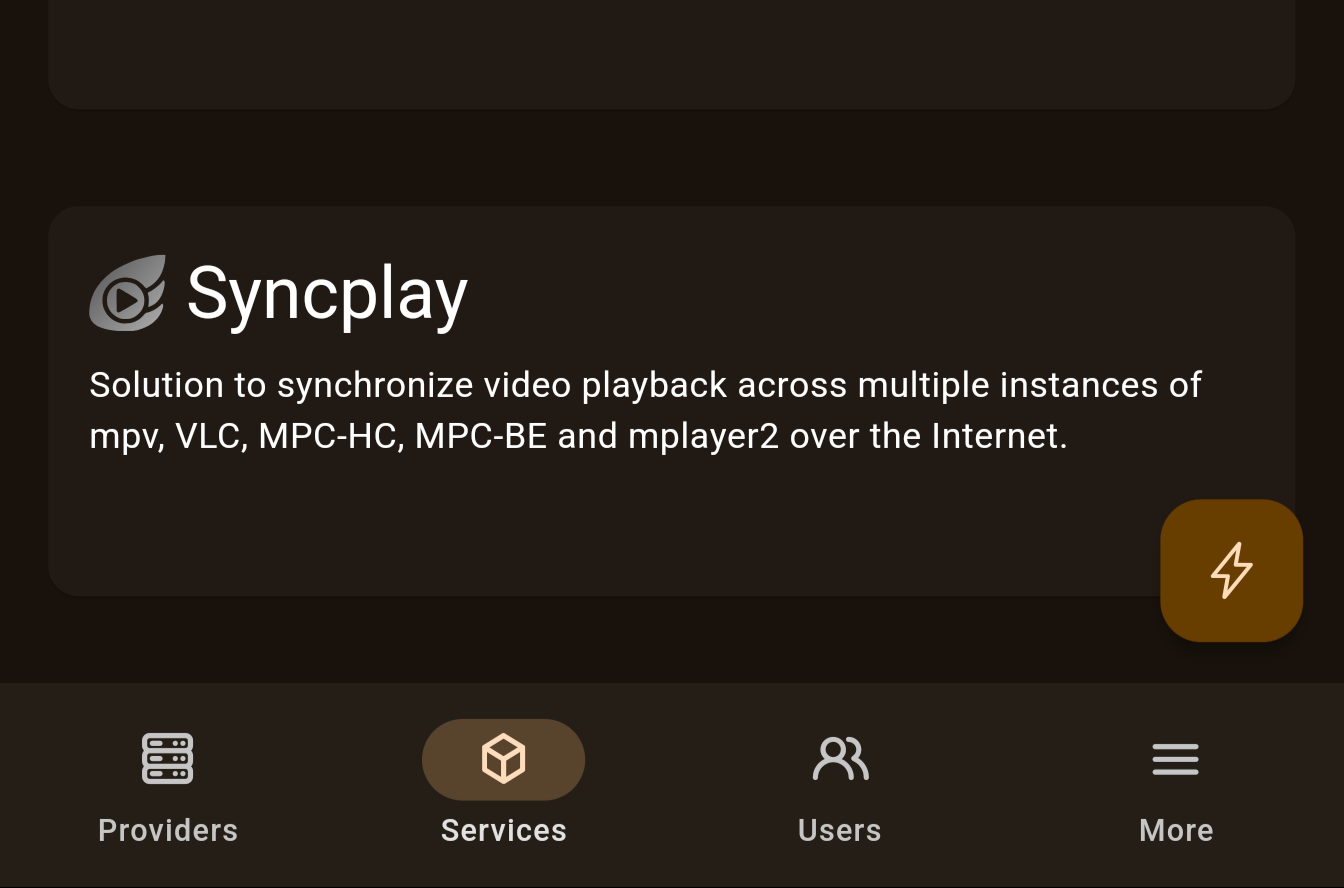
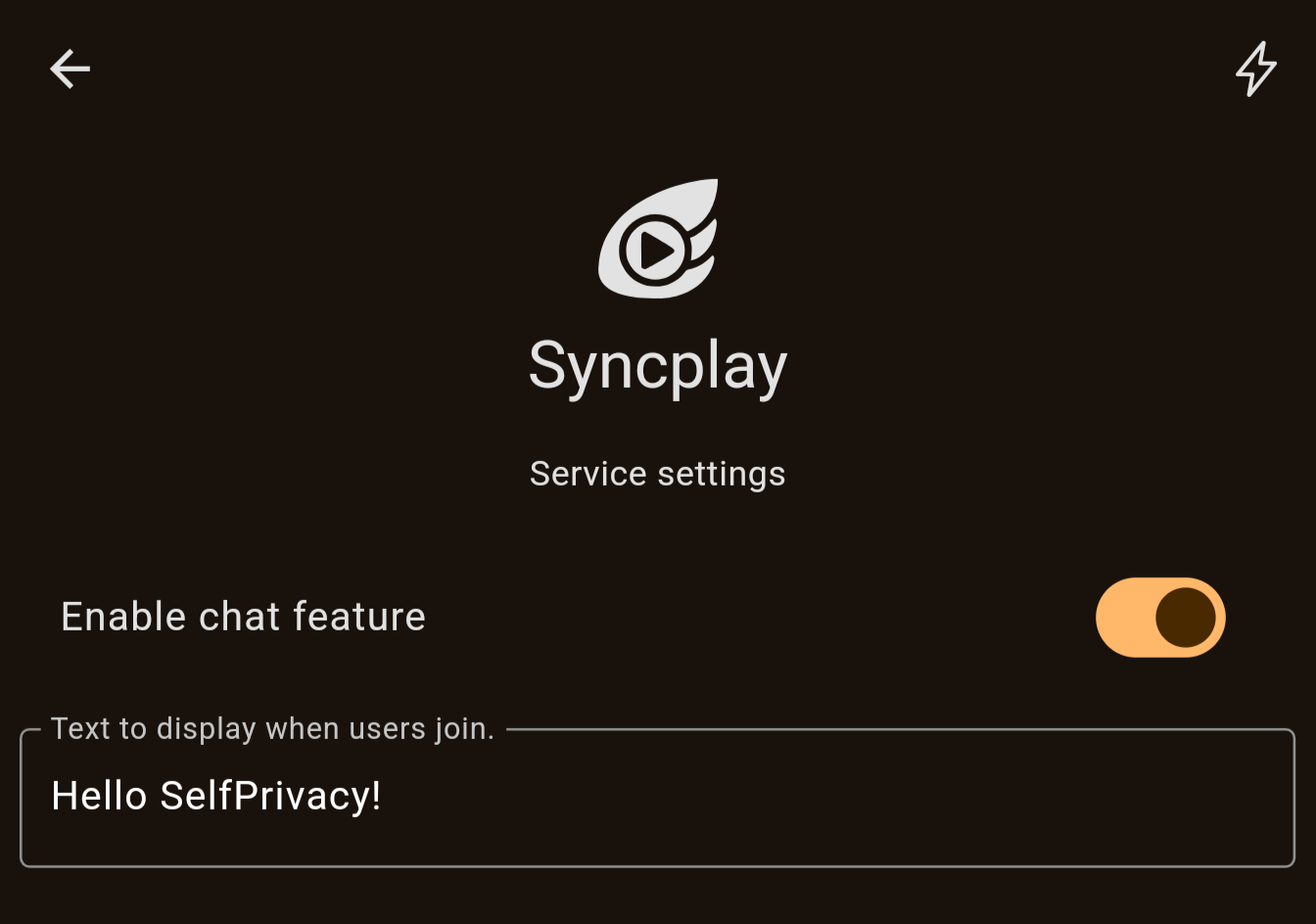
After system rebuild, open your SelfPrivacy app. You will see a Syncplay service appear in your Services list. It is disabled right now, so go ahead and enable it. You can also change the MOTD or disable chat function from the app now.
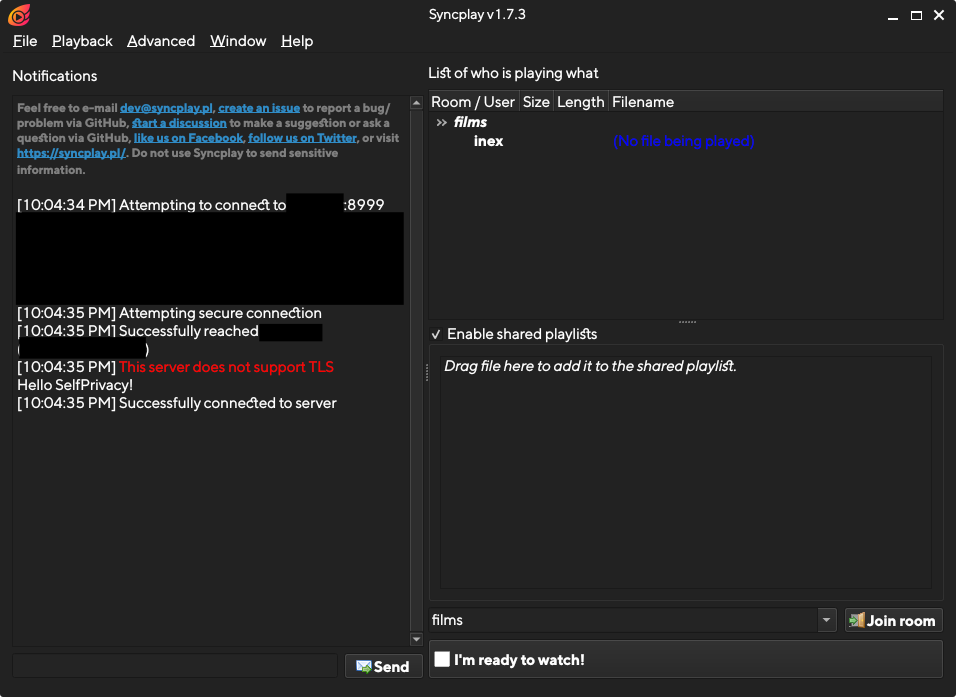
You can now try it out by connecting a Syncplay client to your server, using your.domain:8999
That’s it! Now, you can read the reference below for more advanced topics.
If you do any changes to your SelfPrivacy module and push it to your git repository, these changes will be applied with the next server upgrade.
Reference
Flake metadata
Here is a general overview of all metadata options in the flake.nix file.
{
  description = "Flake description";

  outputs = { self }: {
    nixosModules.default = import ./module.nix;
    meta = {lib, ...}: {
      # Schema version
      spModuleSchemaVersion = 1;
      # Must be the same name as flake and Systemd slice
      id = "jitsi-meet";
      # Service name displayed to a user
      name = "JitsiMeet";
      # Description displayed to a user
      description = "Jitsi Meet is a free and open-source video conferencing solution.";
      # Icon of the service
      svgIcon = builtins.readFile ./icon.svg;
      # Do we need to show URL in the UI? True by default
      showUrl = true;
      # If there are several subdomain options, which one to use to generate the URL?
      primarySubdomain = "subdomain";
      # Can be moved to another volume?
      isMovable = false;
      # Is required for SelfPrivacy operation?
      isRequired = false;
      # Can be backed up by API?
      # Implied to be TRUE by default
      canBeBackedUp = true;
      # Description of the backup
      backupDescription = "Secrets that are used to encrypt the communication.";
      # Systemd services that API checks and manipulates
      systemdServices = [
        "prosody.service"
        "jitsi-videobridge2.service"
        "jicofo.service"
      ];
      # A unix user used by this service
      # By default implied to be the same as the service ID
      user = "jitsi-meet";
      # A unix group used by this group
      # By default implied to be the same as the user
      group = "jitsi-meet";
      # Folders that have to be moved or backed up
      # Ownership is implied by the user/group defined above
      folders = [
        "/var/lib/jitsi-meet"
      ];
      # Same as above, but if you need to overwrite ownership
      ownedFolders = [
        {
          path = "/var/lib/prometheus";
          owner = "prometheus";
          group = "prometheus";
        }
      ];
      # PostgreSQL databases to back up
      postgreDatabases = [];
      # Licenses of this service
      license = [
        lib.licenses.asl20
      ];
      # Homepage for this service
      homepage = "https://jitsi.org/meet";
      # Git repository with the sources of this service
      sourcePage = "https://github.com/jitsi/jitsi-meet";
      # What is our support level for this service?
      # Supported values:
      # - normal
      # - deprecated
      # - experimental
      # - community
      supportLevel = "normal";
      # Single sign-on integration. Only define it if your service
      # authenticates users against the built-in Kanidm SSO.
      sso = {
        # Kanidm group whose members may log in to the service.
        userGroup = "sp.jitsi-meet.users";
        # Optional: Kanidm group whose members get admin access.
        adminGroup = "sp.jitsi-meet.admins";
      };
    };
  };
}
spModuleSchemaVersion
Integer, required. Set it to 1. We will increment it in case we make backwards incompatible changes to our module schema.
id
String, required
An ID of your module. Generally, it is the same as the name of the service your module provides.
Alphanumeric (A-Za-z0-9) symbols and hyphens (-) are allowed. Your systemd slice must have the same name, but with hyphens (-) replaced by underscores (_). It is implied by default that the unix user and group names are the same as the ID. If they are not, you will have to define them separately.
name
String, required
A display name of your module. Generally, it is a display name of the service your module provides.
It will be shown to the user in the app.
description
String, required
A description of your module. Generally, it is a description of the service your module provides.
It will be shown to the user in the app.
svgIcon
String, required
An icon of your module. Generally, it is an icon of the service your module provides.
Usually defined like this: svgIcon = builtins.readFile ./icon.svg;
Place an icon into the icon.svg file. It has the following requirements:
- Icon must only use the black color. It will be recolored by an app depending on the user’s theme and service’s state.
- Icon must be a square and have a square view box.
- Try to flatten the icon and minimize its size.
showUrl
Bool, optional. Implied to be true by default
If true, the app will show an “open in browser” button in the interface.
Usually turned off for the services that don’t provide a web interface.
primarySubdomain
String, optional
By default, API looks at the subdomain option to determine service’s URL. If your service has multiple subdomain, you can set which subdomain option should be used during URL generation.
The option you provide here MUST have a type of string and a widget set to subdomain in its metadata.
isMovable
Bool, optional. Implied to be false by default
If true, API will allow the user to move the module’s folders between disk volumes. In this case, your module MUST have folders or ownedFolders defined, and a location option in your module options is also required. Refer to Mounting user data section.
If false, API won’t allow the user to move the data between disk volumes.
isRequired
Bool, optional. Implied to be false by default
If true, the option to disable or enable the module will be unavailable.
Custom modules MUST set this to false.
canBeBackedUp
Bool, optional. Implied to be true by default
If true, API will allow the user to make backups of this module. It will back up defined folders, ownedFolders and postgreDatabases.
If false, backups feature will be disabled for this module.
backupDescription
String, optional. Implied to be “No backup description found!” by default
If you set canBeBackedUp to true, you must define a brief description of what will be backed up. Here are some examples:
- Password database, encryption certificate and attachments.
- Git repositories, database and user data.
- All the files and other data stored in Nextcloud.
Keep it short, in a single sentence.
systemdServices
A list of strings, required
Here you must define all sytsemd units that API must manage. Use full forms, such as forgejo.service, instead of forgejo.
API will:
- Track their status
- Allow the user to restart them
- Stop these services during backup restoration or when moving between volumes
Generally, all service daemons go here. Utility one-shot units can be omitted here.
Examples:
# Fogejo is a single service.
systemdServices = [
  "forgejo.service"
];
# PHP software on NixOS has units like these
systemdServices = [
  "phpfpm-roundcube.service"
];
# Here, we do not include services such as
# nextcloud-setup, nextcloud-cron or nextcloud-update-db
# because they do not represent the current state of the service.
systemdServices = [
  "phpfpm-nextcloud.service"
];
# Jitsi has several services
systemdServices = [
  "prosody.service"
  "jitsi-videobridge2.service"
  "jicofo.service"
];
user
String, optional. Implied to be the same value as id by default
The unix user of the service provided by this module. Used to ensure ownership of data folders.
group
String, optional. Implied to be the same value as user by default
The unix group of the service provided by this module. Used to ensure ownership of data folders.
folders
List of strings, optional
A list of folders that have to be backed up and moved between volumes. Generally, you should put here folders that you bind mount somewhere in /var/lib. It is implied that these folders are owned by user and group described above. If you need the folder to be owned by someone else, use ownedFolders.
All folders here must be bind mounted! Refer to Mounting user data section for more info.
Examples:
folders = [
  "/var/lib/gitea"
];
folders = [
  "/var/lib/nextcloud"
];
# Due to historical reasons, our Vaultwarden module
# has two folders.
folders = [
  "/var/lib/bitwarden"
  "/var/lib/bitwarden_rs"
];
ownedFolders
List of attrsets, optional
A list of folders that have to be backed up and moved between volumes, but require ownership other than defined in user and group.
All folders here must be bind mounted! Refer to Mounting user data section for more info.
Examples:
ownedFolders = [
  {
    path = "/var/lib/prometheus";
    owner = "prometheus";
    group = "prometheus";
  }
];
postgreDatabases
List of strings, optional
A list of database names, that must be backed up. It is your responsibility to ensure that they exist. Refer to PostgreSQL databases section for more info.
license
List of licenses, optional
A list of license objects. Full list of licenses available: https://github.com/NixOS/nixpkgs/blob/master/lib/licenses.nix
Examples:
# GNU Affero General Public License v3.0 only
license = [
    lib.licenses.agpl3Only
];
# GNU General Public License v3.0 or later
license = [
    lib.licenses.gpl3Plus
];
# Apache License 2.0
license = [
    lib.licenses.asl20
];
# BSD 3-clause "New" or "Revised" License
license = [
    lib.licenses.bsd3
];
homepage
String, optional
URL to the homepage of the service.
sourcePage
String, optional
URL to the source code of the service.
supportLevel
Enum, required
The support level of this module. One of the following values:
normal— A general support level for official modules.deprecated— Deprecated modules that we provide as is.experimental— Experimental modules where we can’t guarantee stable operation yet.community— Modules managed by community.
If you make a custom SelfPrivacy module we advise you to set community value.
sso
Attrset, optional
Describes how the service integrates with the built-in Kanidm single sign-on. Only define it if your service authenticates users against SSO. It has the following fields:
userGroup— required. The Kanidm group whose members are allowed to log in to the service. By convention it issp.<module id>.users.adminGroup— optional. The Kanidm group whose members get administrative access to the service. By convention it issp.<module id>.admins. Omit it if the service has no notion of admins.
sso = {
  userGroup = "sp.gitea.users";
  adminGroup = "sp.gitea.admins";
};
Defining sso in metadata is the declarative half of the integration. The actual OAuth2/LDAP wiring happens inside module.nix using the selfprivacy.passthru.auth API — see Single sign-on (SSO).
Module options
All module options are defined in the following structure:
options.selfprivacy.modules.<MODULE ID> = {
  <OPTION NAME> = (lib.mkOption {
    default = <DEFAULT VALUE>;
    type = <NIX TYPE>;
    description = <DESCRIPTION>;
  }) // {
    meta = {
      type = <UI TYPE>;
      weight = <INT>;
      widget = <UI WIDGET NAME>;
      <OTHER META FIELDS DEPENDING ON UI TYPE>
    };
  };
};
Different UI TYPES have different requirements for metadata fields. There are also three special options:
- enable
- location
- subdomain
These three are so common that the config library provides ready-made helpers for them under the selfprivacy module argument (selfprivacy.types.enableOption, selfprivacy.types.locationOption and selfprivacy.types.subdomainOption). To use them, add selfprivacy to your module’s argument set:
{ config, lib, pkgs, selfprivacy, ... }:
Using the helpers is the recommended way — they expand to exactly the same mkOption + meta structure shown below, so you don’t have to spell it out by hand. Each helper is also overridable if you need to tweak the option or its metadata: selfprivacy.types.subdomainOption "default" { option = { … }; meta = { … }; }.
The weight defines how the options are ordered in UI. By default the weight is 50. There is no need to set it for enable and location options because they are not displayed on the Service Settings screen.
The description is the name of the option to be shown in the UI.
Enable
It is a special option type that is required to be in every SelfPrivacy module. Use the helper and pass the service name:
enable = selfprivacy.types.enableOption "Mumble";
This expands to the following, so writing it by hand is equivalent:
enable = (lib.mkOption {
  default = false;
  type = lib.types.bool;
  description = "Enable Mumble";
}) // {
  meta = {
    type = "enable";
  };
};
You MUST use this value to guard your config like this:
{ config, lib, selfprivacy, ... }:
let
  sp = config.selfprivacy;
  cfg = sp.modules.mumble;
  domain = sp.domain;
in
{
  options.selfprivacy.modules.mumble = {
    enable = selfprivacy.types.enableOption "Mumble";
    # ...other options
  };

  # !! Only apply config if enable set to true.
  config = lib.mkIf cfg.enable {
    # ...config definitions
  };
}
It must follow these rules:
- The name is
enable - The nix type is
lib.types.bool - The default value is
false - The UI type is
enable
Location
It is a special option type that is required to be in every SelfPrivacy module that wants to allow the service data to be moved between volumes.
Generally, the helper is enough:
location = selfprivacy.types.locationOption;
It expands to the following:
location = (lib.mkOption {
  type = lib.types.str;
  description = "Data location";
}) // {
  meta = {
    type = "location";
  };
};
Then, you MUST use it to create a bind mount. Refer to Mounting user data section for more info.
Subdomain
It is a special option type that is required to be in every SelfPrivacy module that needs a subdomain. SelfPrivacy app will ensure that the DNS record for this subdomain exists.
Use the helper and pass the default subdomain:
subdomain = selfprivacy.types.subdomainOption "DEFAULT_SUBDOMAIN";
It expands to the following:
subdomain = (lib.mkOption {
  default = "DEFAULT_SUBDOMAIN";
  type = lib.types.strMatching "[A-Za-z0-9][A-Za-z0-9-]{0,61}[A-Za-z0-9]";
  description = "Subdomain";
}) // {
  meta = {
    widget = "subdomain";
    type = "string";
    regex = "[A-Za-z0-9][A-Za-z0-9-]{0,61}[A-Za-z0-9]";
    weight = 0;
  };
};
Generally, you should use the helper and replace the default value with something sensible. Usually it is a name of the service. You can then use the value in your Nix module to set up a web server, etc.
If you need several subdomains for your module, define several subdomain options with different names, and set the primarySubdomain value in Flake metadata.
String
A generic String value. Will be shown to the user. The Nix type can be lib.types.str or lib.types.strMatching. The meta attrset has the following fields:
type— Set it to"string"widget— Optional. If set, the app will alter the way it renders this option. At the moment, supported values are:"subdomain"
weight— Integer value used to sort option items on the screenregex— If you want the string to be validated with regex, set it here. Also uselib.types.strMatchingas a nix type.allowEmpty— Bool value used to indicated that a string can be empty. False by default.
Some examples of its usage:
# A simple string option
appName = (lib.mkOption {
  default = "SelfPrivacy git Service";
  type = lib.types.str;
  description = "The name displayed in the web interface";
}) // {
  meta = {
    type = "string";
    weight = 1;
  };
};

# Subdomain option uses string type and a subdomain widget
# Here you can see how to use regex validation
subdomain = (lib.mkOption {
  default = "mumble";
  type = lib.types.strMatching "[A-Za-z0-9][A-Za-z0-9-]{0,61}[A-Za-z0-9]";
  description = "Subdomain";
}) // {
  meta = {
    widget = "subdomain";
    type = "string";
    regex = "[A-Za-z0-9][A-Za-z0-9-]{0,61}[A-Za-z0-9]";
    weight = 0;
  };
};

# An example of the string that can be empty
# Notice how we still do not allow null values!
motd = (lib.mkOption {
  default = "";
  type = lib.types.str;
  description = "Text to display when users join.";
}) // {
  meta = {
    type = "string";
    allowEmpty = true;
    weight = 2;
  };
};
Bool
A generic bool value. Can be true or false. Renders in the app as a switch.
Some examples of its usage:
# An option that is true by default
enableLfs = (lib.mkOption {
  default = true;
  type = lib.types.bool;
  description = "Enable Git LFS";
}) // {
  meta = {
    type = "bool";
    weight = 2;
  };
};

# An option that is false by default
requireSigninView = (lib.mkOption {
  default = false;
  type = lib.types.bool;
  description = "Force users to log in to view any page";
}) // {
  meta = {
    type = "bool";
    weight = 5;
  };
};
Enum
A generic enum value. Renders in the app as a dropdown list.
Example of usage:
let
  # Here we define possible values so we do not repeat
  # ourselves in two places.
  themes = [
    "forgejo-auto"
    "forgejo-light"
    "forgejo-dark"
    "gitea-auto"
    "gitea-light"
    "gitea-dark"
  ];
in
{
  # ...other options
  options.selfprivacy.modules.gitea = {
    defaultTheme = (lib.mkOption {
      default = "forgejo-auto";
      # Set the possible values here
      type = lib.types.enum themes;
      description = "Default theme";
    }) // {
      meta = {
        type = "enum";
        # And here.
        options = themes;
        weight = 6;
      };
    };
  };
  # ...
};
Integer
A generic integer value. The Nix type can be any from lib.types.ints. The meta attrset has the following fields:
type— Set it to"int"widget— Optional. If set, the app will alter the way it renders this option. At the moment, supported values are:- coming soon…
weight— Integer value used to sort option items on the screenminValue— Minimum value, optional.maxValue— Maximum value, optional.
Developing modules
Mounting user data
If your service needs to store data on the disk, you have to do the following:
- Add a
locationoption to your module - Find all folders that your service creates and stores data in. Write down the ownership of these folders.
- Find all systemd services that use these folders and write them down.
- In your Nix module, make bind mounts of these folders. You have to mount them from a new folder in
/volumes/${cfg.location}/FOLDER_NAMEto a place where services except the folder to be (for example,/var/lib/FOLDER_NAME). - Add
x-systemd.required-byandx-systemd.beforeoptions to your bind mounts for every systemd unit you found. fsType = "auto";is required since NixOS 26.05.- In the
flake.nixmetadata, definefoldersand/orownedFolders, and also setisMovabletotrue. - Test it. If the service module does not ensure folder ownership, you will have to do it yourself. You might use
systemd.tmpfiles.rulesfor this or write a custom systemd unit.
The mount pattern looks like this:
fileSystems = lib.mkIf sp.useBinds {
      "/var/lib/FOLDER_1" = {
        fsType = "auto";
        device = "/volumes/${cfg.location}/FOLDER_1";
        options = [
          "bind"
          "x-systemd.required-by=SERVICE-1.service"
          "x-systemd.required-by=SERVICE-2.service"
          "x-systemd.required-by=SERVICE-3.service"
          "x-systemd.before=SERVICE-1.service"
          "x-systemd.before=SERVICE-2.service"
          "x-systemd.before=SERVICE-3.service"
        ];
      };
      "/var/lib/FOLDER_2" = {
        fsType = "auto";
        device = "/volumes/${cfg.location}/FOLDER_2";
        options = [
          "bind"
          "x-systemd.required-by=SERVICE-1.service"
          "x-systemd.required-by=SERVICE-2.service"
          "x-systemd.required-by=SERVICE-3.service"
          "x-systemd.before=SERVICE-1.service"
          "x-systemd.before=SERVICE-2.service"
          "x-systemd.before=SERVICE-3.service"
        ];
      };
    };
With this configuration, in flake.nix:
{
  description = "...";

  outputs = { self }: {
    # ...
    meta = { lib, ... }: {
      # ...
      folders = [
        "/var/lib/FOLDER_1"
        "/var/lib/FOLDER_2"
      ];
      # ...
    };
  };
}
Some modules that you can use as examples:
Systemd slices
Every SelfPrivacy module must have its own systemd slice. Slice must have the same name as the module ID, but with hyphens (-) replaced by underscores (_). For example, my-awesome-service becomes my_awesome_service.slice. The slice is used for resource usage monitoring.
You will have to find all systemd units your module creates. You can use systemctl status for this to look up all units that do not belong to SelfPrivacy slices. Usually they end up in system.slice.
To set a slice for systemd units use the following pattern. In this example, we found three systemd units: jicofo.service, jitsi-videobridge2.service and prosody.service. The module ID is jitsi-meet, so we need to add them all to the jitsi_meet.slice.
systemd = {
  services = {
    jicofo.serviceConfig.Slice = "jitsi_meet.slice";
    jitsi-videobridge2.serviceConfig.Slice = "jitsi_meet.slice";
    prosody.serviceConfig.Slice = "jitsi_meet.slice";
  };
  slices.jitsi_meet = {
    description = "Jitsi Meet service slice";
  };
};
PostgreSQL databases
SelfPrivacy manages a PostgreSQL database for you. If you need a database, do the following:
- Ensure that the Postgre database and user for your service exist using
services.postgresql.ensureDatabasesandservices.postgresql.ensureUsers. User name must be the same as the unix user name of your service. Peer auth is used, no password required. - Tell your service to use a socket connection. The socket directory is at
/run/postgresql. - Add database names to
postgreDatabasesfield of yourflake.nixmetadata.
An example of ensuring the database exists:
services.postgresql = {
  ensureDatabases = [
    "pleroma"
  ];
  ensureUsers = [
    {
      name = "pleroma";
      ensureDBOwnership = true;
    }
  ];
};
And then, for this example, in flake.nix set postgreDatabases = [ "pleroma" ]; in the meta attrset.
Reverse proxy
If your service provides a web service, you might want to use a reverse proxy. Just define a subdomain option for your module and add a nginx virtual host to your module. Here are some examples:
# Just proxy to a localhost port
services.nginx.virtualHosts."${cfg.subdomain}.${sp.domain}" = {
  # This is important: SelfPrivacy uses wildcard TLS certificates.
  useACMEHost = sp.domain;
  forceSSL = true;
  # if needed, you can define custom headers here.
  extraConfig = ''
    add_header Strict-Transport-Security $hsts_header;
    add_header 'Referrer-Policy' 'origin-when-cross-origin';
    add_header X-Frame-Options DENY;
    add_header X-Content-Type-Options nosniff;
    add_header X-XSS-Protection "1; mode=block";
    proxy_cookie_path / "/; secure; HttpOnly; SameSite=strict";
  '';
  locations = {
    "/" = {
      proxyPass = "http://127.0.0.1:3000";
    };
  };
};

# If you use a NixOS module that already sets up nginx, you will have to overwrite certificate like this!
services.nginx.virtualHosts."${cfg.subdomain}.${sp.domain}" = {
  forceSSL = true;
  useACMEHost = domain;
  enableACME = false;
};
Single sign-on (SSO)
SelfPrivacy ships a built-in Kanidm identity provider. If your service can authenticate users against an external identity provider, you should integrate it with SSO so that users log in with their single SelfPrivacy account. Two protocols are available:
- OAuth2 / OpenID Connect (OIDC) — the preferred method for web services.
- LDAP — for services that only speak LDAP.
Integration has three parts: declaring intent in the flake metadata, requesting the auth config paths, and wiring the service in module.nix.
1. Declare sso in flake.nix
Add an sso attribute to your meta, naming the Kanidm groups your service uses. See sso in the metadata reference.
sso = {
  userGroup = "sp.vikunja.users";
  # Optional, only if the service has admins:
  adminGroup = "sp.vikunja.admins";
};
2. The selfprivacy.passthru.auth API
The auth module exposes helpers under config.selfprivacy.passthru.auth that give you everything needed to talk to Kanidm without hardcoding anything:
| Attribute | Type | Description |
|---|---|---|
oauth2-provider-name |
string | Human-readable provider name (currently "Kanidm"). |
oauth2-discovery-url |
function clientID -> url |
OIDC discovery (.well-known/openid-configuration) URL for your client. |
mkOAuth2ClientSecretFP |
function linuxGroup -> path |
Path to the file holding your service’s OAuth2 client secret. Readable by linuxGroup. |
mkServiceAccountTokenFP |
function linuxGroup -> path |
Path to the LDAP service-account token file (only if isTokenNeeded). |
oauth2-systemd-service |
string | The Kanidm systemd unit (kanidm.service); order your service after it. |
auth-fqdn |
string | FQDN Kanidm is served on. |
ldap-host, ldap-port |
string / int | LDAP endpoint. |
ldap-base-dn |
string | LDAP base DN, e.g. dc=example,dc=com. |
admins-group, full-users-group |
string | Server-wide Kanidm groups (sp.admins, sp.full_users). |
3. Register an OAuth2 client in module.nix
To make Kanidm aware of your service, define an entry under selfprivacy.auth.clients.<clientID>. The auth module generates the matching Kanidm provisioning and the client-secret file for you. Here is the OAuth2 wiring from the Vikunja module:
{ config, lib, pkgs, selfprivacy, ... }:
let
  sp = config.selfprivacy;
  cfg = sp.modules.vikunja;
  auth-passthru = config.selfprivacy.passthru.auth;

  oauthClientID = "vikunja";
  oauth2-provider-name = auth-passthru.oauth2-provider-name;
  oauthDiscoveryURL = auth-passthru.oauth2-discovery-url oauthClientID;
  # Kanidm group; by convention "sp.<module id>.users".
  usersGroup = "sp.vikunja.users";
  # Path to the generated OAuth2 client secret, readable by this group.
  oauthClientSecretFP = auth-passthru.mkOAuth2ClientSecretFP oauthClientID;
in
{
  config = lib.mkIf cfg.enable {
    # Tell the service to use OIDC (service-specific).
    services.vikunja.settings.auth.openid.providers.kanidm = {
      name = oauth2-provider-name;
      authurl = lib.strings.removeSuffix "/.well-known/openid-configuration" oauthDiscoveryURL;
      clientid = oauthClientID;
      scope = "openid profile email";
    };

    # Load the client secret into the service via a systemd credential.
    systemd.services.vikunja.serviceConfig.LoadCredential =
      "oauth2-secret:${oauthClientSecretFP}";

    # Register the OAuth2 client with Kanidm.
    selfprivacy.auth.clients.${oauthClientID} = {
      inherit usersGroup;
      subdomain = cfg.subdomain;
      isTokenNeeded = false;
      originLanding = "https://${cfg.subdomain}.${sp.domain}/";
      originUrl = "https://${cfg.subdomain}.${sp.domain}/auth/openid/${lib.strings.toLower oauth2-provider-name}";
      clientSystemdUnits = [ "vikunja.service" ];
      enablePkce = false;
      linuxUserOfClient = "vikunja";
      linuxGroupOfClient = "vikunja";
    };
  };
}
The fields of selfprivacy.auth.clients.<clientID>:
usersGroup— Kanidm group allowed to log in. Defaults tosp.<clientID>.users.adminsGroup— optional Kanidm group with admin access.subdomain— the service’s subdomain.originLanding/originUrl— OAuth2 redirect landing and callback URL(s).originUrlmay be a single string or a list.linuxUserOfClient/linuxGroupOfClient— the service’s unix user/group, used to grant read access to the secret file.clientSystemdUnits— units that depend on the OAuth2 setup; they are ordered after secret generation.enablePkce— whether to require PKCE between the client and Kanidm.isTokenNeeded— set totrueif the service needs an LDAP service-account token (then read it frommkServiceAccountTokenFP linuxGroupOfClient).scopeMaps/claimMaps— optional advanced Kanidm scope/claim mapping.
SSO implementation examples
- Mixed (Sync users/permissions from LDAP, login with oAuth)
- oAuth / OIDC